Thursday, 15 January 2015

Text and sound

I made an animation before and I used it to add text onto it, this text fades out, I will show you how I did this, the Program which I used for this for Adobe Flash

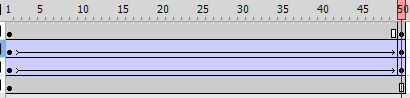
Step one: Firstly I opened up my old animation, I then added another layer, this is the layer which I will be adding the text onto, make sure you have a keyframe where you want your writing to come off the screen.

Step Two: Next you add text, but when you add the text make sure you add it when you are on the layer which you plan to have the text on.


Step Three: Next make sure you are on the layer which the text is on and turn it into a symbol, there is print screens below showing you how to do this, turn it into a graphic

Step Four: Make sure the text is in dynamic, you do this by clicking on the writing it self and then you get this menu which is shown on the prinscreen to your right, and then make it so it says dynamic text.

Step Five: then you click onto the writing when you are on the layer and you should get this kind of menu which is shown below where it says "alpha" it should say something else but change it to alpha.

Step Six:  then you click on the end or start keyframe and you should then change it to a classic tween, but before doing that change the opacity to zero.
this is just below where it says alpha,

Step Seven: Then you have to highlight all of the layer which you will be animating, make sure it is all highlighted of that layer

Step Eight: On the printscreen which I have showed how to make it into a symbol, it says classic tween under it, click that with all the layer still highlighted, then your animation  should fade in and out or out and in.

Step Nine: Then you should click file>Export then
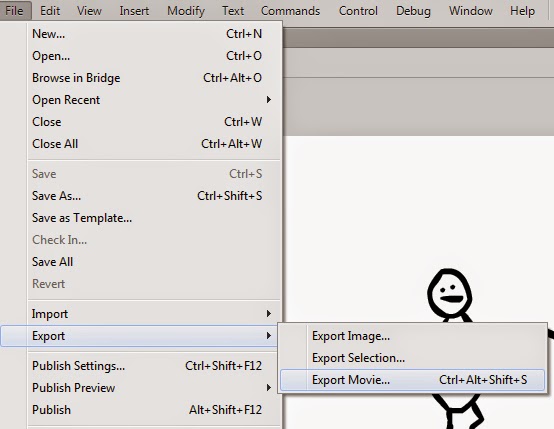


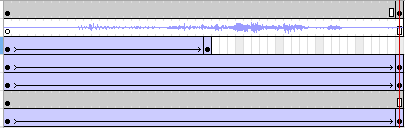
if you want to also add sound onto your animation, you download the sound as a wav or MP3 and then you make another layer on your Flash, this layer is for where the sound will be at, make sure the sound you have put on matches the length of your animation, I could not do this because of problems with my flash or audition, audition is for editing sound.

Once you have your audio file drag it onto the layer where the sound will be based on, its best to keep it separate from other layers so you can separate them all in case  you wanna seperate them all in the future.
when you export it, export it as an avi, this is just so you can upload it to sites such as blogger, like this.


Friday, 12 December 2014

Animations in our lifetime

American Dad. 
Creator: Seth Macfarlane

The first episode of American Dad aired on February 6th of 2005 and it is still getting aired, also making new episodes. so this Animated TV series is nearly 10 years old.

I was looking on what software they used to make series such as family guy and of course american dad, it doesnt specify which one but I assume it is one of the softwares below which is made by Toon Boom Animation (Reference)

  • Toon Boom Opus (formerly USAnimation[1] - This Toon Boom software is commonly used in the traditional film/TV animation industry. This software contains all the tools required to handle traditional animation workflows from scanning to compositing and 2D/3D integration. Its centralized database system allows the sharing of assets between scenes and enables the workload to be shared efficiently across a studio or even between studios. As of April 2008, Toon Boom Opus has been discontinued.
  • Toon Boom Harmony (formerly Toon Boom Symphony) - Like Opus, this software is based on a centralized database system and is used in the Film and TV animation industry. It contains all the Opus features and has additional tools that can be used for cut-out animation style. These tools include pencil lines with textures, the deformation tool, morphing, inverse kinematics, particles and 2D-3D integration. Harmony can also be used as a paperless animation solution, drawing animation directly into the software, using a Wacom tablet. Harmony is available as a network or stand-alone license.


The target audience for american dad, which I think is Teenagers who are aged between 19-14 but a lot of ages most likely watch it who are older than that, I just think the most people who watch it are aged around that area.

Friday, 5 December 2014

2D Animation history.

Here is a short clip from the animation series for kids which the first episode was made in 1995 and the last episode was made on 2003, but this show still gets shown because of how entertaining some of the episodes are. This is a 2D animation.

The creator of it was   Genndy Tartakovsky, he created a lot of animation such as
dexters laboratory, samurai jack and stars wars: clone wars, he is known mostly for Dexters laboratory, the animation series only lasted 6 years tho but it was aired by Cartoon Network so this helped it a lot. In 2011 he joined Sony Pictures Animation and still currently works for them. He is directing the new popeye film which will be released in 2016, it will be animated so they will be going back to the roots with it.

Friday, 21 November 2014

Task 7

Here I am going to show you how I made my animation move, in this as you can see, I made his arm move and the lever move at the same time.

Step one: I firstly drew the image I was going to do, but for this part, I drew each part of the image on a different layer, so I can move them separately, this made it a lot easier for me in the long run. The image below shows that I have also named my layers to make it easier for me to figure out what layer is which


Step two: I then added key frames to each of my layers so all my layers would show when it is being animated, I added the keyframes all at 50fps, but the choice of where to add your keyframes is up to you.


Step Three: Next you click on the layer you want to make move and click on modify>Convert to symbol and then convert it to a graphic


Then simply export it as a gif.

Friday, 19 September 2014

First 2D Animation Post

This blog is going to be based around my lessons on 2D animation.

 Family guy.I chose this because it is one of my favorite scenes and I also chose this because it is a short scene to use as an example.

Dexters Laboratory. Considering this is a Cartoon show for children, this is probably one of the funniest scenes I have seen in the show


The Grim Adventures of Billy and Mandy. I chose this scene because its one of my favorite scenes that I can remember and also find.

First Post

This blog is going to be based around my lessons on 2D animation.